FutureING Planning Game
Design and maintain your automated production hall to maximize profit while fulfilling orders within time and budget constraints.
FutureING Planning Game is a multiplayer management game developed for mobile platforms and released annually for mechanical engineering students as part of the ATPO module at TH Koeln University. The game is a part of interactive experiences designed to enhance the learning process of students by teaching them soft skills like teamwork, planning, and resource management in a gamified manufacturing setting. Players work in teams to design a production hall by placing assembly cells, then manage automated production to fulfill daily orders while balancing time, budget, and efficiency.
Fact sheet
Genre
Multiplayer Online Management Game
Platform
Mobile
Project Length
2 years
Engine
Unity
Team Size
4 to 5
Trailer
Responsibilities
Development Cycle 1: (2023)
Designed the in-game production logic system
Contributed to designing core gameplay loops and game progression system
Collaborated with programmers to prototype and implement systems and mechanics
Contributed to UI and UX design (creating mock ups)
Sound Design and Implementation
Development Cycle 2: (2024)
Took full ownership of game design after transition to solo designer role
Coordinated with programmers, and artists for the initial launch
Iterated on game balance, pacing, and difficulty progression
Created and improved tutorial systems to enhance onboarding experience
Development Cycle 3: (2025)
Led successful 2025 release with positive student reception
Analyzed player feedback and implemented data-driven design improvements
Designed UI elements to clearly communicate game state and provide visual feedback
Led comprehensive UX redesign to simplify game interactions and reduce cognitive load for players and reduced information complexity
Built and distributed game releases for iOS platform
Contributed to programming implementation alongside design responsibilities
Project Gallery


Design Process
The FutureING Planning Game project was initiated in 2023 with the goal of concepting and pitching a redesign of an existing mobile game, using it as the foundation to build something new. The development went through three cycles: conception and prototyping, polishing and initial release, and finally analyzing gathered feedback and improving the game with the main goal of delivering a standalone version to the university.
Cycle 1: Conception
During the conception phase my approach started with analyzing the major problems with the original game. The previous game was an online multiplayer co-op game where players had to buy assembly cells and AGVs for their production hall to deliver a required number of products in each level. Once they bought the machinery, players would press a button to start production and watch a simulation run until time was up or enough products were produced.
The problem was that watching was essentially all they did for nearly half the playtime. Once production started, control left the player entirely. On top of that, the simulation had a recurring technical flaw: it crashed. Tracing the root cause, I found that the underlying production loop logic was generating edge cases that turned into loopholes and broke the simulation.
My solution started with designing a new production loop logic that would enable players to make meaningful decisions and contribute more actively by setting up the assembly cells and giving them finite production cycles. These changes were also aligned with the learning objectives of the course, which focused on soft skills like planning and management in a team setting. Players had to communicate and work together to set up the machines and observe the production to address any product jams resulting from their decisions. The overall objective remained delivering different types of products within a limited time and budget.
The new game included three product types and seven different worksteps that products had to go through in specific combinations to become finished and ready to deliver. Assembly cells had different properties, some of which were modifiable by the player. After buying a machine, players could configure which worksteps would be active and how many production cycles the machine would run before becoming available to reconfigure again.
Cycle 2: Initial Release
After proving the concept with a playable and stable prototype, the second cycle's goal was to release the initial polished version to the students. The main challenge of this cycle was making sure the networking aspects of the gameplay worked smoothly and could support the volume of students playing simultaneously. The other focus was the onboarding experience and teaching the game through the designed tutorial.
The initial release suffered from both technical issues and design problems that were causing confusion among players. Data-driven feedback was gathered after the release through in-game logs and student reviews.
Cycle 3: Improve Design toward the Final Release
For the next release we had one year to fix the problems and deliver a version that could stand alone without any maintenance. My focus during this phase was improving the gameplay design by providing solutions to the observed issues experienced by players.
Players could not read the production cycles, which meant they couldn't communicate effectively to solve the problems they were facing throughout the game. There were also mechanics available that were not changing the state of the game significantly, causing confusion rather than meaningful choice. Last, due to the menu-driven nature of the gameplay I realized there was potential to reduce the number of interactions needed to access key information, and to add more visual feedback to better communicate the state of the game. The main technical problems were addressed in parallel through active playtesting and bug fixing.
The 2025 release was reviewed positively by students, validating the iteration over these problems.
Design Approach Highlights
Redesigned the core production loop logic
The original production logic was built around a simulation that ran autonomously once players pressed start, with no meaningful intervention points. Beyond the crashes this caused, it also meant the system had no room for player agency during production. The new logic I designed introduced a request-based model where assembly cells actively communicate their state, sending bring and collect requests that AGVs respond to in real time. This created a live, readable production flow that players could observe, interpret and act on, and gave programmers a stable, predictable system to build on.
![[Assembly Cell Loop diagram]](https://static.wixstatic.com/media/88200f_23f91371e37948099b4c9ae34248b827~mv2.png/v1/fill/w_980,h_240,al_c,q_85,usm_0.66_1.00_0.01,enc_auto/88200f_23f91371e37948099b4c9ae34248b827~mv2.png)
![[Transportation Loop diagram]](https://static.wixstatic.com/media/88200f_f52fe1a20601412a9ebaa738673e0d3f~mv2.png/v1/fill/w_980,h_480,al_c,q_90,usm_0.66_1.00_0.01,enc_auto/88200f_f52fe1a20601412a9ebaa738673e0d3f~mv2.png)
Redesigned the Assembly Cell panel to reduce complexity and cognitive load
The original setup, which I had designed in the earlier development cycles, had two separate panels for each assembly cell: one for configuration accessible before starting the machine, and one for real-time information visible during production. Here you can see screenshots from mock up to final panel in initial released version of the game:


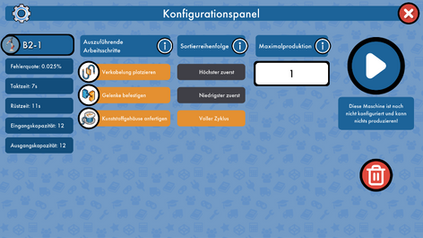


I combined them into a single panel for two reasons. First, I wanted players to immediately see the request queues once they started a machine, so they could understand how their configuration choices were affecting the assembly cell's production in real time. Second, to make both panels fit into one without overloading it, I reduced the number of tweakable parameters, removing options that added complexity without meaningfully contributing to the core experience.

Improved machine state communication and reduced interaction friction
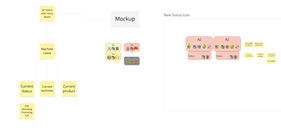
Playtesting revealed that players struggled to read the production floor at a glance because the icons didn't communicate enough. I designed a status banner that sits on top of each machine and displays the current state in text, the active workstep, the current tooling, and the product being processed. Players could now scan the hall and understand what every machine was doing without opening a single panel.

As a follow-on improvement I also added a hold-tap shortcut that lets players start a machine directly from the hall using its previous configuration, without opening the panel at all. A small change, but it meaningfully reduced the number of steps between a player's decision and the game responding to it.
Here you can see screenshots of the mock up and prototyping stages of the new status icon: